Print a Ukiyo-e at FedEx
5 June 2026
This post documents a process I worked through recently: finding a free, high-resolution scan of a specific Japanese woodblock print, preparing it for large-format printing, and getting it printed at a FedEx Office. I’m writing it up in detail because I ran into a lot of dead ends that I’d like to save other people from.
The print I was after was 「風流てらこ吉書はじめけいこの図」(Fūryū Terako Kissho Hajime Keiko no Zu — roughly, “First Calligraphy Class of the New Year at a Fashionable School”), a vertical ōban nishiki-e triptych by Utagawa Toyokuni I (初代豊国), published around 1804. The image appeared in a book I was reading, with a credit to the National Diet Library (国立国会図書館). I’ll use it as the worked example throughout, but the process generalizes to most ukiyo-e.
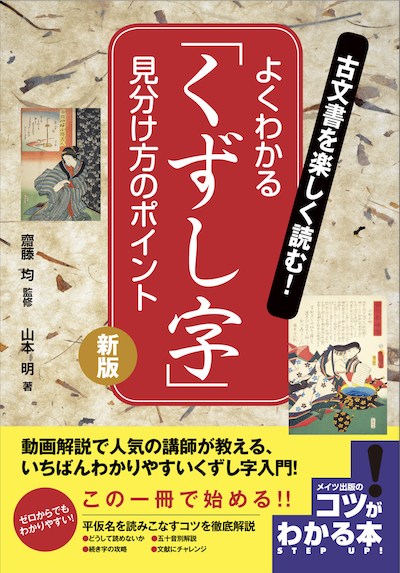
I first saw just one panel of this art in the book 古文書を楽しく読む! よくわかる「くずし字」 見分け方のポイント 新版 (コツがわかる本!)
Step 1: Understand what you’re looking for
Before you search for a scan, it helps to know a few things about the physical format of your print.
Ōban (大判) is the most common format for nishiki-e: approximately 38 × 25 cm (15 × 10 in) per sheet. Many compositions are triptychs (三枚続, sanmaitsuzuki) — three vertical sheets meant to be displayed together, totaling roughly 38 × 76 cm (15 × 30 in). This matters for printing because:
- Museum catalogs often hold individual sheets separately, with different accession numbers for each panel of the same triptych.
- A “complete” scan of the triptych may still only be ~2000 px wide — which crops down to ~660 px per panel if you want just one sheet.
- At 300 dpi (print standard), 660 px renders to about 2.2 inches wide. That’s not a useful print.
So knowing upfront whether you want one panel or the full triptych, and at what size, shapes your entire search strategy.
Step 2: Where to find free, high-resolution scans
ukiyo-e.org
ukiyo-e.org is the best starting point. It aggregates images from dozens of museum collections worldwide — MFA Boston, the Art Institute of Chicago, the Library of Congress, Rijksmuseum, and many others — and provides direct links to the highest-resolution downloads each institution makes available. Search by artist name, title, or subject. It also does reverse image search, which is useful if you have a photograph of your print.
For the Toyokuni triptych, the complete three-sheet composition was available at:
https://data.ukiyo-e.org/mfa/images/sc215328.jpg(2000 × 1028 px, full triptych)
And the right-sheet panel alone (a separate impression):
https://data.ukiyo-e.org/mfa/images/sc154616.jpgThese link directly to the MFA Boston’s servers. The catalog records at MFA are:
- Right sheet: https://collections.mfa.org/objects/215638 (accession 11.13830)
- The complete triptych record includes sheets 11.13830, 11.13831 (center), and 11.13832 (left)
MFA Boston
The Museum of Fine Arts, Boston has one of the largest ukiyo-e collections in the world and offers free high-resolution downloads of public-domain works. Go directly to collections.mfa.org and search by artist, title, or accession number. The download button appears on individual object pages. Their scans are typically the same files served through ukiyo-e.org.
NDL Digital Collections (国立国会図書館デジタルコレクション)
The National Diet Library at dl.ndl.go.jp holds an enormous collection of nishiki-e and is often the source credited in Japanese publications. Their scans are typically several thousand pixels on the long side — better than most museum scans for large printing.
How to search: Go to the site, navigate to the 古典籍資料 (Rare Books and Old Materials) collection, and use the on-page search box. Filter by サブカテゴリ → 錦絵 to narrow to woodblock prints. Search for distinctive words from the title — for this print, 「吉書」 or 「寺子」 work better than the full title, since the catalog may use variant kanji (e.g., 稽古之図 vs. けいこの図).
Important caveat: The NDL site is JavaScript-rendered and cannot be reliably accessed by automated tools or bots. URL parameters like searchWord= no longer work after a site redesign — you must type queries directly into the on-page search box. Some records are also restricted to physical NDL visitors or registered library card holders. Most Edo-period nishiki-e are openly downloadable, but check the access label (ログインなしで閲覧可能 = freely accessible; 送信サービスで閲覧可能 = restricted).
Other institutions worth checking
- Waseda University Library (archive.wul.waseda.ac.jp) — strong for Edo-period popular culture
- Tokyo Metropolitan Library digital collections (都立図書館) — useful but also JavaScript-rendered
- Ritsumeikan ARC (www.dh-jac.net) and jpsearch (jpsearch.go.jp) — aggregate search across Japanese institutions; hit-or-miss
Step 3: Assess your file’s print resolution
Once you have a scan, figure out what print size it supports. The math is straightforward:
Maximum print width (inches) = pixel width ÷ DPIFor print: - 300 dpi = photo-quality, for prints you’ll look at up close - 200 dpi = acceptable for art prints viewed at arm’s length - 150 dpi = passable for large-format prints viewed from a distance
Example: the MFA’s 2000 px wide triptych scan:
| DPI | Maximum print width |
|---|---|
| 300 | 6.7 inches |
| 200 | 10 inches |
| 150 | 13.3 inches |
For a single cropped panel (~660 px wide):
| DPI | Maximum print width |
|---|---|
| 300 | 2.2 inches |
| 200 | 3.3 inches |
| 150 | 4.4 inches |
The original ōban sheet is about 10 inches wide. So to print a single panel at true size and 300 dpi, you’d need at least a 3000 px wide scan of that panel — roughly 4.5× more pixels than the MFA triptych crop yields.
Step 4: Upscale if needed
If you can’t find a better scan, upscaling is a realistic option — and ukiyo-e is almost the ideal subject for it. The characteristics that make AI upscaling work best are exactly what ukiyo-e has:
- Flat color fields with clean edges (not continuous-tone gradients)
- Crisp carved outlines (the key block lines)
- Relatively low noise in the original
A 3–4× upscale of a 2000 px triptych produces a ~6000–8000 px file, which prints the full triptych at roughly its original 30-inch width at around 200–260 dpi. That’s very good for a wall print.
Recommended tools
Upscayl — Free, open-source, runs locally on Mac, Windows, or Linux. Nothing is uploaded to any server. This is the right tool for most people. For ukiyo-e, try the “High Fidelity” or “Remacri” model rather than any “photo” model — the photo models sometimes over-smooth flat color fields.
Topaz Gigapixel AI — The paid gold standard. More model options and generally slightly cleaner results, but expensive and overkill for most purposes.
Practical tips:
- Do a small test crop first (just a face, a detail with fine line work) before upscaling the whole file. This saves time and lets you compare models.
- 4× is usually the practical ceiling; beyond that you’re generating detail rather than recovering it.
- Save as TIFF for printing, not JPEG — JPEG compression introduces artifacts at large sizes.
Step 5: Request a scan from the NDL (alternative to upscaling)
If you want a true archival scan rather than an upscaled one, the NDL offers 遠隔複写 (enkaku fukusha, remote photoduplication): you submit a request online, NDL staff locate the item and scan it, and they send you a digital file for a modest fee. This bypasses the search problem entirely — you don’t need to find the record yourself, just describe the item clearly.
Details at: https://www.ndl.go.jp/jp/copy/remote/index.html
Step 6: Prepare your file for FedEx
FedEx Office accepts files via: - Upload at fedex.com/office (order online, pick up in store or ship) - USB drive brought to the store - Email to a specific store’s address
File format: PDF or high-resolution JPEG/TIFF. If you’re printing large format, PDF is safer because it preserves exact dimensions.
Color mode: RGB is fine for FedEx’s inkjet large-format printers. Don’t convert to CMYK — that’s for offset printing.
Resolution: As discussed above, aim for at least 150 dpi at your intended print size. 200–300 is better.
Know your intended dimensions before you go. FedEx large-format pricing is by the square foot, and the staff will need to know what size you want. For reference, a single ōban panel at true size is about 10 × 15 inches; the full triptych is about 15 × 30 inches.
Step 7: Pricing at FedEx Office
Prices vary by location and change periodically; call or upload online for a quote. As of mid-2026:
- Standard letter-size (8.5 × 11”) color copy: ~$0.71–$0.76 per page, self-service
- Large format (wide-format inkjet): priced per square foot; typically $3–8/sq ft depending on paper stock
- Paper options: glossy photo paper will look closest to the original print’s surface; matte is less reflective and easier to frame without glare. I’ve tried both, and I much prefer matte.
FedEx often runs 20% off promotions for online orders. Check before ordering in person.
Copyright note
Most Edo-period ukiyo-e (pre-1868) are firmly in the public domain. Scans from museums are generally also public domain in the US under Bridgeman Art Library v. Corel Corp (1999), though some institutions attempt to assert copyright over their digital reproductions. For personal printing, this is a non-issue. For publication or commercial use, check the institution’s terms.
Summary
| Step | Action |
|---|---|
| 1 | Identify format (ōban, triptych, etc.) and desired print size |
| 2 | Search ukiyo-e.org → follow to MFA, NDL, or other source |
| 3 | Check pixel dimensions against your target print size |
| 4 | Upscale with Upscayl (free) or Topaz Gigapixel if needed |
| 5 | Or request an NDL 遠隔複写 for a true archival scan |
| 6 | Export as PDF or TIFF at correct dimensions |
| 7 | Upload to FedEx Office or bring on USB |